common-sse 模块使用
什么是 SSE
Server-Sent Events (SSE) 是一种服务器推送技术,允许服务器向客户端推送实时数据。与 WebSocket 不同,SSE 是单向通信,仅支持服务器向客户端推送消息。
SSE 特点
- 基于 HTTP 协议,实现简单
- 单向通信,服务器主动推送
- 自动重连机制
- 文本数据传输
前端配置
开启 SSE 功能
在项目根目录的 .env 文件中配置:
使用 SSE 组件
在需要接收服务器推送的页面中引入并使用 SSE 组件:
💡组件位置建议
推荐放在前端的 main.vue 全局组件中,确保全局接收服务器推送消息
uri 属性说明: SSE 服务端接口地址,格式为 /xxx/sse/info(xxx 为实际微服务路由前缀)
<template>
  <sse uri="/admin/sse/info"/>
</template>

<script setup>
// 异步加载 SSE 组件
const Sse = defineAsyncComponent(() =>
  import("/@/components/SSE/index.vue")
)
</script>
后端配置
添加依赖
在目标微服务的 pom.xml 中添加 SSE 依赖:
<dependency>
  <groupId>com.pig4cloud</groupId>
  <artifactId>pigx-common-sse</artifactId>
</dependency>
⚠依赖互斥
common-sse 和 common-websocket 二选一,两者不要混用
发送消息
⚠注意导入包路径
如果使用 MessageDistributor 发送消息,请确保导入的是 com.pig4cloud.pigx.common.sse.distribute.MessageDistributor(common-sse 模块),而不是 com.pig4cloud.pigx.common.websocket.distribute.MessageDistributor(common-websocket 模块)。两个模块存在同名接口,导入错误的包会导致消息发送功能无法正常使用。
使用 SseEmitterHolder 获取用户的 SSE 连接并发送消息:
public void sendMessage(Long userId, String message) {
    try {
        SseEmitter sseEmitter = SseEmitterHolder.getSseEmitter(userId.toString());
        if (sseEmitter != null) {
            sseEmitter.send(message);
        }
    } catch (Exception e) {
        log.error("发送 SSE 消息失败", e);
    }
}
业务场景示例
场景1: 发送通知消息
@Service
@RequiredArgsConstructor
public class NotificationService {

    /**
     * 发送通知给指定用户
     */
    public void notifyUser(Long userId, String content) {
        try {
            SseEmitter emitter = SseEmitterHolder.getSseEmitter(userId.toString());
            if (emitter != null) {
                emitter.send(content);
            }
        } catch (Exception e) {
            log.error("发送通知失败, userId: {}", userId, e);
        }
    }
}
场景2: 批量发送消息
/**
 * 批量发送消息给多个用户
 */
public void batchSendMessage(List<Long> userIds, String message) {
    userIds.forEach(userId -> {
        try {
            SseEmitter emitter = SseEmitterHolder.getSseEmitter(userId.toString());
            if (emitter != null) {
                emitter.send(message);
            }
        } catch (Exception e) {
            log.error("批量发送消息失败, userId: {}", userId, e);
        }
    });
}
消息展示
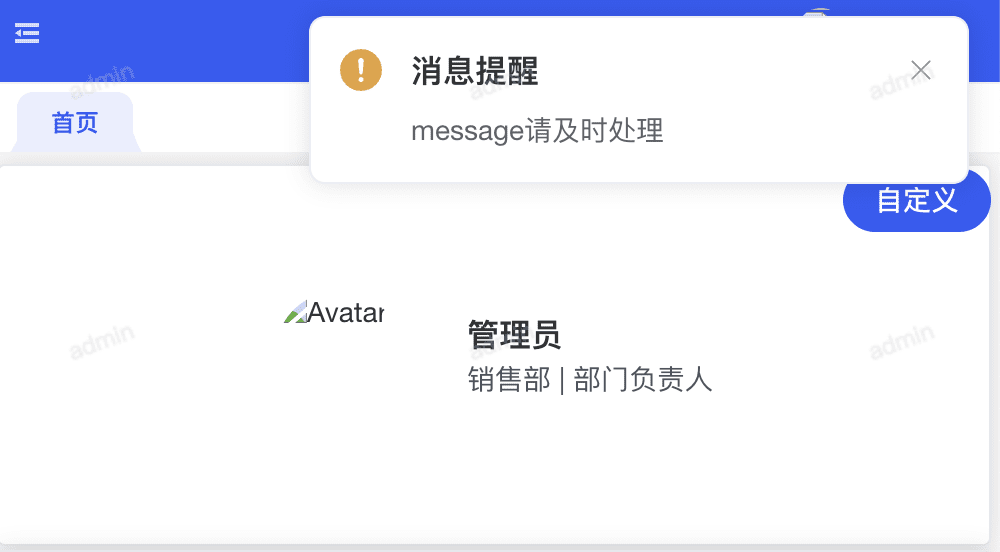
组件默认会在页面右上角以通知形式展示接收到的消息,如下图所示。
如需自定义消息展示效果,可以修改 /@/components/SSE/index.vue 组件的实现。
SSE vs WebSocket
| 特性 | SSE | WebSocket |
|---|
| 通信方向 | 单向(服务器→客户端) | 双向 |
| 协议 | HTTP | WebSocket 协议 |
| 浏览器支持 | 较好 | 优秀 |
| 实现复杂度 | 简单 | 较复杂 |
| 自动重连 | 内置 | 需手动实现 |
| 适用场景 | 服务器推送通知、进度条 | 实时聊天、实时协作 |
💡使用建议
如果只需要服务器向客户端推送消息,建议使用 SSE,实现更简单。如果需要双向实时通信,则选择 WebSocket